

Every fixed-rate loan — mortgage, car loan, personal loan, student loan — comes with an amortization payment schedule. It is the complete, row-by-row breakdown of every payment you will make: how much covers interest, how much reduces your balance, and exactly what you still owe after each instalment. Most borrowers glance at the monthly payment figure and sign. The ones who actually read the amortization schedule table walk away with a fundamentally different understanding of what they are committing to — and that understanding frequently saves them tens of thousands of dollars over the life of the loan.
Key Takeaways
- An amortization payment schedule shows every payment split between interest and principal for the full loan term.
- Early payments on long-term loans are overwhelmingly interest — sometimes 85–90% on a new 30-year mortgage.
- Extra principal payments produce a compounding benefit that grows larger the earlier they are made.
- A loan amortization calculator lets you model any loan and generate a full schedule before you sign anything.
- The amortization schedule is the correct tool for evaluating refinancing — not the monthly payment alone.
What Is Loan Amortization — and Why Does It Shape Every Payment You Make?
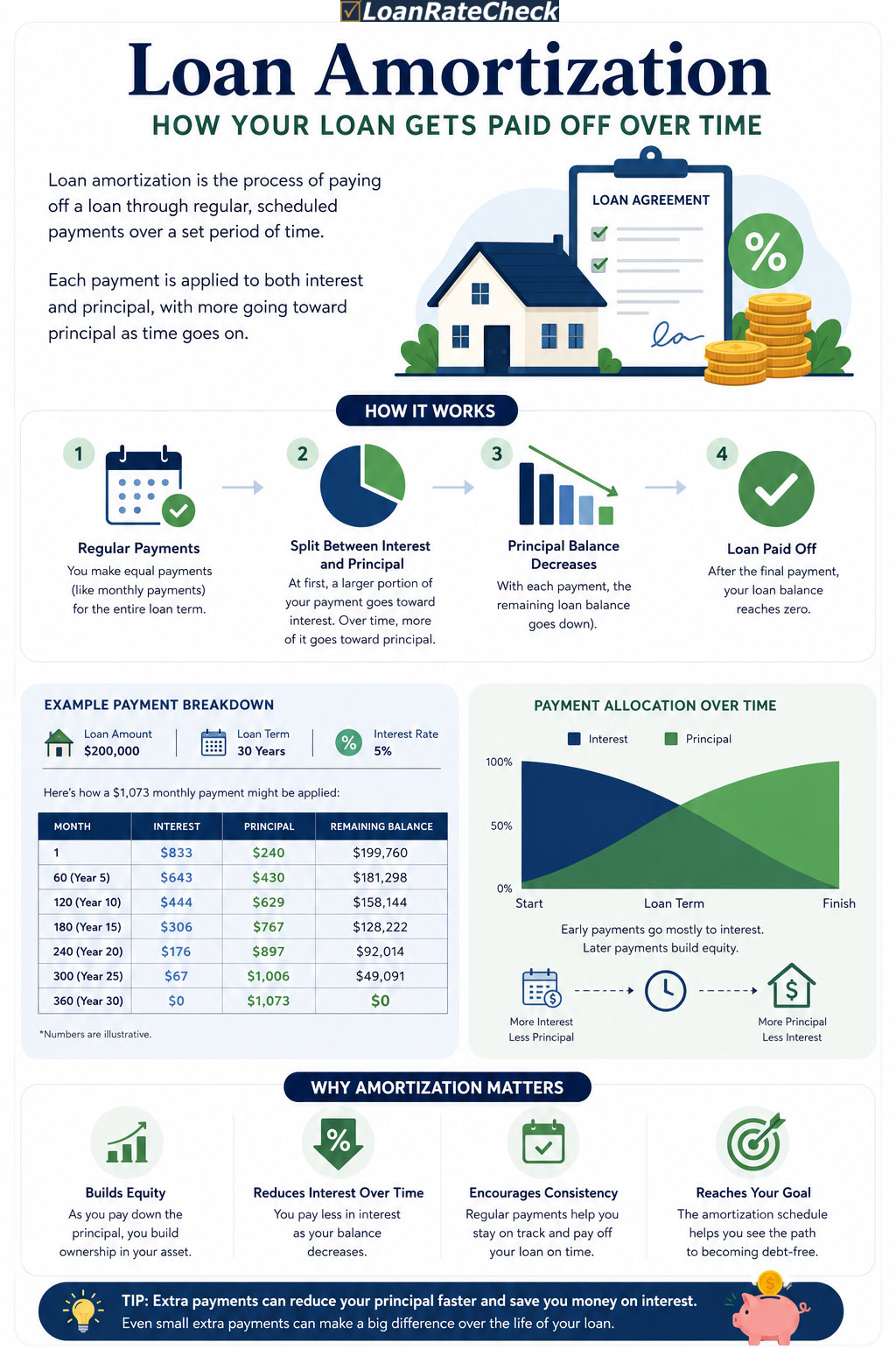
Loan amortization is the structured process of eliminating a debt through scheduled, equal payments over a fixed period. The word itself comes from the Old French amortir — to deaden or kill — which is exactly what the process does: it gradually extinguishes the debt, payment by payment, until the balance reaches zero on a defined date. What makes amortization distinctive — and what most borrowers do not fully appreciate — is that the internal composition of each equal payment changes every single month. The total amount you pay never varies, but the split between interest and principal is completely different in month one than it is in month one hundred. This shifting internal structure is the engine of the amortization payment schedule.
The mechanics arise from a simple rule: interest is calculated monthly on the outstanding balance. When the balance is highest — at the start of the loan — the interest charge is highest, leaving the smallest slice of each payment for principal reduction. As the balance slowly falls, the interest charge falls correspondingly, and progressively more of each fixed payment attacks the principal. According to the Consumer Financial Protection Bureau, this pattern applies to any fixed-rate instalment loan — mortgage, auto, personal, or student — regardless of the loan amount or term length.
The Loan Amortization Formula: What Drives the Numbers
The fixed monthly payment on any amortizing loan is calculated using one formula: M = P × [r(1+r)ⁿ] / [(1+r)ⁿ − 1]. Here M is the monthly payment, P is the principal (loan amount), r is the monthly interest rate (annual rate divided by 12), and n is the total number of monthly payments. This formula is constructed so that applying it to the declining balance each month produces a sequence of equal payments that exactly zeros out the balance at payment n. The formula itself explains why amortisation feels so skewed toward interest early on: the denominator gets smaller as the balance shrinks, but so does the interest charge — and the formula holds them in precise balance from start to finish.
The practical implication is that your monthly payment is fully determined by just three variables: loan amount, interest rate, and term. Change any one of them and the entire amortization payment schedule changes. A rate reduction of 0.5% on a $300,000 mortgage does not just lower the monthly payment — it restructures all 360 rows of the schedule, shifting more of each payment toward principal from day one. This is why a loan amortization calculator is so valuable: it makes the downstream consequences of any rate, term, or amount change immediately visible in the full schedule, not just in the headline monthly figure. Check current rates from top lenders here to see how even a small rate improvement reshapes your schedule.
How to Read an Amortization Payment Schedule
An amortization payment schedule is typically presented as a table with one row per payment period — monthly for most consumer loans. Each row contains five core pieces of information: the payment number or calendar date, the total payment amount, the interest portion of that payment, the principal portion, and the remaining balance after the payment is applied. Some schedules add a sixth column for cumulative interest paid to date, which is particularly revealing because it shows the running total of money that has left your pocket without reducing your debt. By mid-term on most 30-year mortgages, that cumulative interest figure exceeds the original loan amount — meaning you have paid more in interest alone than you originally borrowed.
Reading the schedule sequentially reveals the shift pattern: in year one of a $300,000 mortgage at 6.5%, you pay roughly $23,000 in combined P&I — but only about $5,300 reduces your balance. Year five: $23,000 paid, approximately $7,200 reduces principal. Year fifteen: $23,000 paid, around $13,000 reduces principal. Year twenty-five: $23,000 paid, over $19,000 reduces principal. The total payment never changes — but the proportion working in your favour grows every single month without exception. The amortization schedule table makes this visible in a way that no summary figure can replicate.
The Amortization Schedule Table: What Every Column Actually Tells You
The amortization schedule table is not just a list of payments — each column answers a specific and useful financial question. The interest column tells you the exact cost of carrying your current balance for one more month: it is your remaining balance multiplied by the monthly rate, recalculated fresh each period. The principal column tells you how much your balance actually fell — the only part of each payment that builds equity or reduces what you owe. The cumulative interest column answers the question most borrowers never ask: how much have I paid to the lender in total so far, with nothing to show for it on my balance? And the remaining balance column is the number that matters for insurance claims, refinancing decisions, selling the property, or calculating your net worth at any given point.
The annual summary version of the amortization schedule table — which groups all twelve monthly payments into yearly totals — is often more practical for long-term planning. It lets you see at a glance that in year one, approximately 77% of your mortgage payment went to interest; in year ten, about 65%; in year twenty, about 47%; in year twenty-eight, the crossover point where principal exceeds interest for the first time. Understanding these percentages transforms how you think about refinancing timing, extra payment strategy, and the true cost of extending or shortening your loan term. Our amortisation table calculator displays both the monthly detail and annual summary, with an interactive chart that makes the shift pattern immediately visual.
The Interest Front-Loading Problem — and Why Your Lender Doesn't Volunteer This
Interest front-loading is not a trick or a predatory practice — it is the mathematically inevitable result of applying a fixed-percentage interest charge to a large outstanding balance. But it has real financial consequences that lenders have little incentive to highlight. On a $300,000 mortgage at 6.5% over 30 years, the total interest paid over the full term is approximately $383,000 — more than the original loan. In the first ten years alone, roughly $180,000 leaves your account as interest while the balance falls by only about $38,000. Most borrowers who understand this intuitively think it sounds roughly right — until they see those numbers in a specific row of a real amortization payment schedule, at which point the reality tends to land differently.
The Federal Reserve's consumer credit data consistently shows that a significant proportion of borrowers refinance or sell before reaching the midpoint of their loan term — the point where the principal reduction per payment finally overtakes the interest charge. This means the average mortgage borrower never reaches the principal-dominant phase of their amortization schedule — they restart the clock, re-entering a new schedule's interest-heavy early years. Understanding this pattern is one of the most practically useful things any borrower can take from studying their amortization payment schedule.
Extra Payments and the Amortization Schedule: The Numbers That Change Everything
The single most actionable insight from an amortization schedule is the impact of extra principal payments — and the earlier they are made, the greater the compounding benefit. When you pay extra principal in any given month, that amount is subtracted from the balance before next month's interest is calculated. Next month's interest is therefore smaller — by the extra amount multiplied by the monthly rate. That freed-up fraction of the regular payment also hits principal, further reducing the following month's balance. The effect compounds silently across every remaining payment for the rest of the loan term. According to LendingTree, even modest extra payments can eliminate years from a 30-year mortgage and save tens of thousands in interest.
The concrete numbers are compelling. On a $300,000 mortgage at 6.5% over 30 years with a monthly P&I of $1,896: adding $100 per month saves approximately $36,000 in total interest and cuts the term by three years and four months. Adding $300 per month saves around $88,000 and shortens the loan by eight years. Adding $500 per month saves over $126,000 and eliminates more than twelve years from the payoff timeline. The key point — visible when you generate the full schedule — is that these savings are not linear. The earlier extra payments begin, the disproportionately larger their impact. A $100 extra payment starting in month one saves more than a $110 extra payment starting in year five. Generate your own amortization payment schedule with extra payments to see this in your specific numbers.
Using a Loan Amortization Calculator Before You Borrow or Refinance
A loan amortization calculator does something no lender disclosure does by default: it shows you the complete cost of the loan across its entire life, not just the monthly payment. Enter the loan amount, annual rate, and term — and the calculator produces the full amortization payment schedule, the total interest, the payoff date, and an interactive chart showing the principal-interest split for every year. The chart alone — seeing that 80% of early payments is orange (interest) and progressively turning navy (principal) over the years — communicates the front-loading dynamic more effectively than any table. Enter an extra monthly payment and the entire schedule regenerates, showing the new payoff date and precise interest saving instantly.
The most important use of a loan amortization calculator is comparison: model two scenarios side by side before making a decision. Thirty-year versus fifteen-year mortgage at the rates you have been quoted — not the hypothetical rates in a brochure. Your current loan at its remaining balance versus a proposed refinance at a new rate and term. The same loan amount at 7% versus 6.5% over sixty months. In each case, the calculator makes the true long-term cost of each option concrete before any commitment is made. This is the purpose the tool was built for — not to confirm a decision you have already emotionally made, but to inform one you are still evaluating.
15-Year vs 30-Year Mortgage: What the Amortization Schedule Table Reveals
$300,000 Mortgage — Amortization Schedule Comparison
| Metric | 30-Year at 6.5% | 15-Year at 6.0% | Difference |
|---|---|---|---|
| Monthly P&I | $1,896 | $2,532 | $636/mo more on 15yr |
| Total Interest Paid | $382,633 | $155,683 | $226,950 saved on 15yr |
| Balance after 5 years | $278,300 | $213,100 | $65,200 more equity on 15yr |
| Balance after 10 years | $249,800 | $103,400 | $146,400 more equity on 15yr |
| Interest in Year 1 | ~$19,400 (86%) | ~$17,800 (59%) | 15yr less interest-heavy immediately |
| Payoff | May 2056 | May 2041 | 15 years earlier on short term |
* Illustrative figures based on $300,000 principal. Generate your exact amortization schedule table using the calculator with your specific rate and start date.
Using the Amortization Schedule to Evaluate Refinancing
The Clock-Reset Problem Most Refinance Calculators Miss
The standard refinance break-even calculation — closing costs divided by monthly savings — is necessary but insufficient. It ignores what happens to your amortization payment schedule when you refinance. If you are in year eight of a 30-year mortgage and refinance into a new 30-year loan, you reset the amortization clock completely. You re-enter the interest-heavy early years on your new, slightly lower balance. Your monthly payment may fall — but you are now committing to payments for a total of 38 years from your original purchase date, and a significant portion of those additional years will be interest-dominated. The correct analysis compares the total remaining interest on your current schedule to the total interest on the proposed refinance over its full term — not just the monthly payment difference.
When a Shorter-Term Refinance Transforms the Schedule
Refinancing into a shorter term — from 30 years remaining to 15 — restructures the amortization payment schedule far more dramatically than a rate reduction alone. The monthly payment increases, but the schedule shifts immediately and permanently toward principal dominance. In year one of a 15-year loan, roughly 55–65% of each payment goes to principal — compared to 13–18% in year one of a 30-year loan at the same rate. For borrowers who can absorb the higher monthly payment, a term-shortening refinance is one of the highest-leverage financial moves available. Use the loan amortization calculator to compare your current remaining schedule to both a rate-only refinance and a rate-plus-term refinance, side by side.
Whether you are taking out a mortgage, refinancing an existing loan, evaluating a personal loan offer, or simply trying to understand what you already owe — the amortization payment schedule is the most honest document your lender produces. It hides nothing. Every dollar of interest, every month of front-loading, every payment's split between cost and equity — it is all there in the amortization schedule table. The borrowers who read it tend to make better decisions: they make extra payments earlier, they refinance into shorter terms when the schedule supports it, and they negotiate from a position of knowledge rather than accepting whatever monthly figure they are first presented. A good loan amortization calculator puts all of this in your hands before you sign a single document.
Frequently Asked Questions
What is an amortization payment schedule?
An amortization payment schedule is a complete table listing every payment across the life of a fixed-rate loan. Each row shows the payment date or number, total payment amount, interest portion, principal portion, cumulative interest paid to date, and remaining balance. It reveals the shifting split between interest and principal across the loan term — heavily weighted toward interest in early payments and toward principal in later ones. Most lenders are required to provide this schedule at closing, and you can generate one for any loan using a loan amortization calculator before applying.
How do I read an amortization schedule table?
Each row of an amortization schedule table represents one payment period. Read across the row: the interest column shows that month's charge — your remaining balance multiplied by the monthly rate. The principal column shows how much your balance actually fell. The cumulative interest column shows the running total of all interest paid so far. The balance column shows what you still owe. Early rows have large interest and small principal figures; late rows reverse this. The crossover point — where principal first exceeds interest — typically occurs around 60–70% through a 30-year loan's term.
What is an amortisation table calculator?
An amortisation table calculator (using the British English spelling) is the same tool as a loan amortization calculator — it generates a complete amortization schedule table from three inputs: loan amount, annual interest rate, and loan term in months or years. The table shows every payment split into interest and principal, with running totals and remaining balances. Good amortisation table calculators also include an interactive chart showing the principal-interest shift visually, extra payment modeling, and export options for the full schedule.
Why do early loan payments go mostly to interest?
Interest on amortizing loans is calculated as a percentage of the outstanding balance — so when the balance is highest at the start of the loan, the interest charge is also highest. On a $300,000 mortgage at 6.5%, the first payment's interest portion is approximately $1,625 out of a $1,896 total payment — leaving only $271 for principal. As the balance falls with each payment, the interest charge falls too, and progressively more of the fixed payment reduces the balance. This is the natural mathematical result of the amortization formula, not a lender practice.
How much can extra monthly payments save on a 30-year mortgage?
The savings from extra payments depend on the loan balance, rate, and timing — but they are consistently substantial. On a $300,000 mortgage at 6.5%, an extra $100 per month saves approximately $36,000 in total interest and cuts the term by over three years. An extra $300 saves around $88,000 and shortens the loan by eight years. Extra payments made early in the loan produce disproportionately larger savings than the same payments made later, because they reduce the balance before more interest accrues. Use a loan amortization calculator to model your exact saving.
Is a 15-year or 30-year mortgage better according to the amortization schedule?
The amortization schedule table for a 15-year mortgage shows dramatically more principal reduction in every early payment compared to a 30-year equivalent. On a $300,000 loan at comparable rates, the 15-year option saves over $220,000 in total interest at the cost of approximately $636 more per month. Which is better depends on your cash flow, job stability, and other financial priorities — but the schedule makes the trade-off precise rather than abstract. Many financial advisors suggest the 30-year with extra payments as a middle path that preserves flexibility.
How does refinancing affect my amortization payment schedule?
Refinancing replaces your existing loan with a new one, creating an entirely new amortization payment schedule that starts from the beginning — meaning the early payments are again interest-heavy. If you refinance into a longer term, you extend the total interest-paying period even if the rate is lower. If you refinance into a shorter term, you shift immediately to more principal-dominant payments. The correct way to evaluate refinancing is to compare the total remaining interest on your current schedule to the total interest on the proposed new schedule — not just the monthly payment difference.
Can I generate an amortization schedule for any type of loan?
Yes. The amortization formula and the resulting payment schedule work identically for any fixed-rate instalment loan — mortgage, auto, personal, student, or business loan. The inputs are always the same: loan amount, annual interest rate, and term. LoanRateCheck's loan amortization calculator supports mortgage, auto, personal, student, and other loan types, producing full monthly and annual schedule tables with interactive charts for any combination of inputs.
What is negative amortization and should I be worried about it?
Negative amortization occurs when a monthly payment is smaller than the interest charge for that period. Instead of reducing the balance, the unpaid interest is added to the principal — meaning the borrower owes more after making the payment than before. This cannot occur with standard fixed-rate fully amortizing loans, which this calculator models. It can occur with certain adjustable-rate products that have payment caps, graduated payment loans, or deferred interest structures. If your loan has any of these features, request a full amortization projection from your lender before accepting.
Ready to Run Your Own Numbers?
Use LoanRateCheck's free loan amortization calculator to model your payment and explore your full amortization schedule — all in one place, with no registration required.
Open the Loan Amortization Calculator →